Write your approved links, and undo a batch
Approved links are written to WordPress together, as one batch, when you press the button in the bar at the foot of Links to add. Each batch can be undone as a whole: Silotree takes out exactly the links it added and leaves everything else in the post as it is.
Steps
Press Review list in the bar at the foot of Links to add
Approve links on Links to add. The dark bar at the foot of the screen counts them. Press Review list to see them under Review before writing.
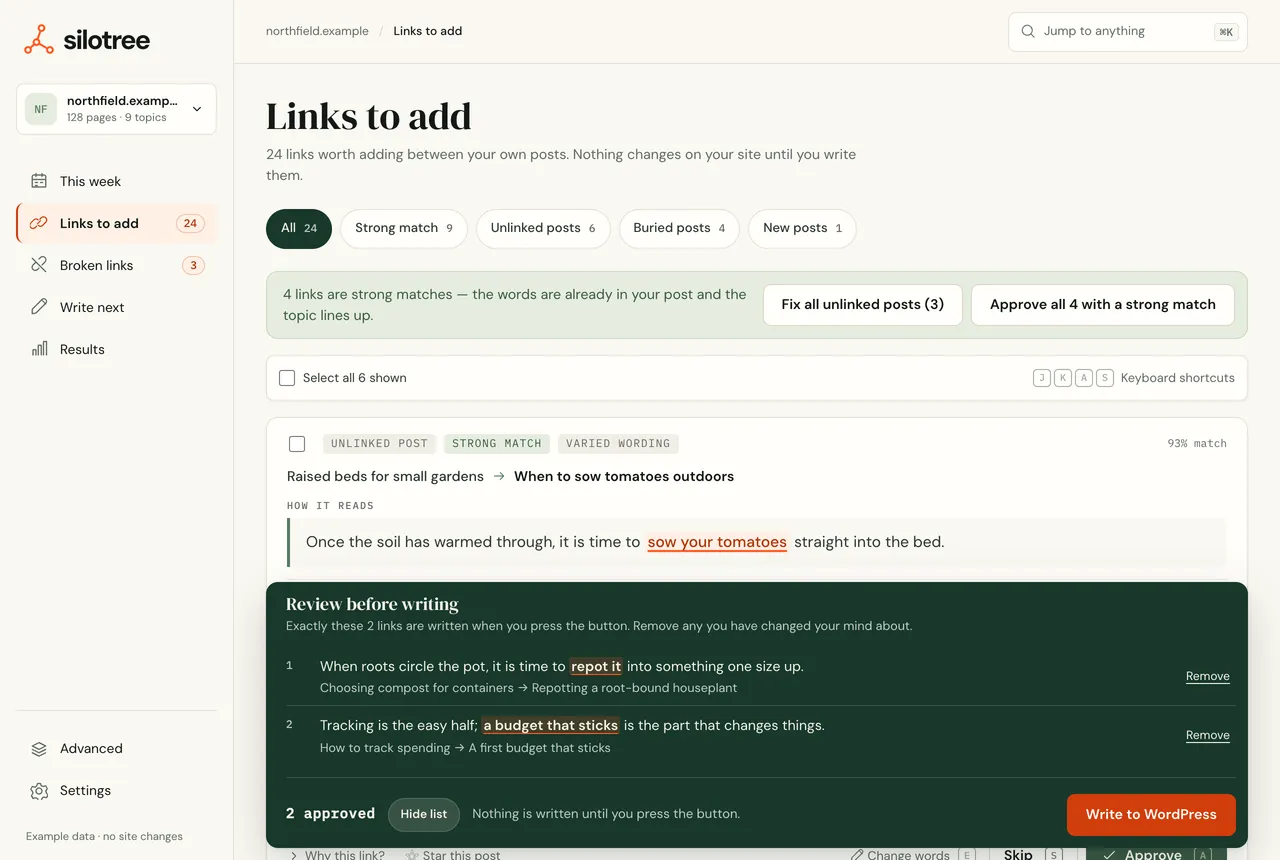
Review before writing. Remove any link you have second thoughts about. Remove anything you have second thoughts about
Press Remove next to a link to take it out of this batch. It goes back to Links to add, undecided.
Press Write to WordPress
Press Write to WordPress. On the free plan the button says Write 3 free while free links are left. Silotree sends the links to the plugin, which saves a revision of each post and then wraps the words in a link. Nothing else in the post is changed. One batch is written at a time per site.
Read the result
The bar reports what happened: 5 links written to WordPress., and if any were refused, how many could not be added and why. A link refused because of the post as it stands — the words have gone, or it is already linked — is set aside, since it would be refused every time; the next scan suggests it again if it still fits. A link skipped because someone had the post open stays approved, to write next time.
To undo, open Results → Changes & undo and press Undo
Every batch is listed on Results → Changes & undo. Press Undo, then Yes, undo it. Silotree takes out exactly the links that batch added, post by post, and leaves everything written since. The message says how many posts were restored and how many could not be. Undone links go back to Links to add as undecided.
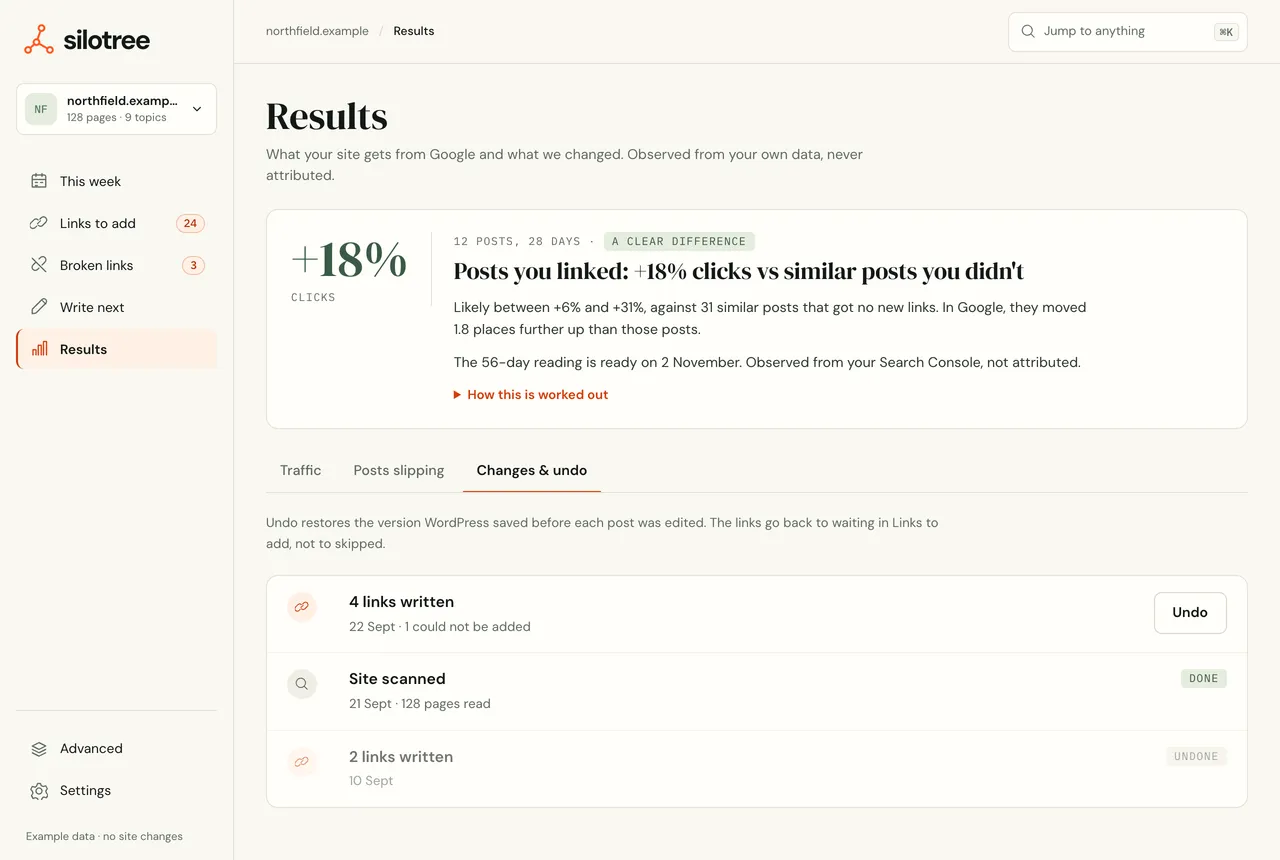
Results → Changes & undo lists every batch, newest first. Batches of broken-link fixes are listed and undone the same way. You can also undo from WordPress: Silotree → Undo lists the same batches, labelled Approved in Silotree, Added from WordPress or with the keyword rule’s words.
What you should see
The posts contain the new links. Open one in WordPress to see them, or use the links report in the plugin. After an undo, those links are gone and the rest of each post is as you left it.
If it doesn’t work
- Some links “could not be added”
Each refusal names its reason. Find it in a link didn’t land.
- “This site is not connected to WordPress yet”
The button says Connect WordPress. Install and connect the plugin — see connect WordPress.
- “Links are already being written to this site”
Another batch is still running, perhaps from another tab. Wait for it to finish, then try again.
- “Revisions are turned off on this site”
Silotree won’t change a post it cannot put back. Turn revisions on (
WP_POST_REVISIONSinwp-config.php) and write again.- “Your 10 free links are used”
Approved links are saved, and written the moment you move to a paid plan. See upgrade or change your plan.
- An undo says some posts “could not be” put back
Someone edited those links since, or the post was deleted. Silotree leaves edited links alone rather than overwrite your changes. Press Undo again to retry the rest, or remove the remaining links by hand.
- “No undo record was kept for that batch”
The plugin was deleted and reinstalled, which removes undo records. Remove those links by hand in WordPress.
A batch can be undone for as long as the plugin is installed. Deleting the plugin removes its undo records — see uninstall the plugin.
Questions
Is there a time limit on undoing a batch?
No. A batch can be undone for as long as the plugin is installed. Undo removes only that batch’s links, so anything you wrote in the post since stays.
Does undoing give me back free links?
Yes. On the free plan only links still in your posts count towards the 10, so undoing a batch makes room again.
What does WordPress keep?
A revision of each post, saved before it is changed. Silotree will not edit a post if revisions are turned off.