Link chosen words everywhere with keyword rules
A keyword rule links a phrase to one of your pages in every post that already contains it. Nothing runs by itself: you preview the exact sentences first, then apply the rule as one batch you can undo.
- A WordPress user who can edit other people’s posts (an Editor or Administrator). Link rules is hidden from other roles.
- Applying a rule writes links, so it counts towards the free plan’s 10 written links — see plans and limits. Previewing is always free.
Steps
Open Silotree → Link rules
In WordPress, open Silotree → Link rules. Nothing on this screen runs by itself.
Fill in Add a rule and press Add and preview
- Words to look for: 3 to 100 characters. Only posts that already contain them change, and the words stay exactly as each post has them.
- Match letter case exactly: tick it to link “Rose” but not “rose”.
- Link them to: the address of one of your own posts or pages.
- In at most this many posts: 0 for no limit.
- Leave these posts alone: post IDs or addresses, one per line.
Press Add and preview.
Check the preview
The preview card, marked Nothing changed yet, lists each post the rule would change and the sentence where the link would go, with the words highlighted. Each post gets the link once, on the first place the words appear outside headings, buttons, captions, code and existing links.
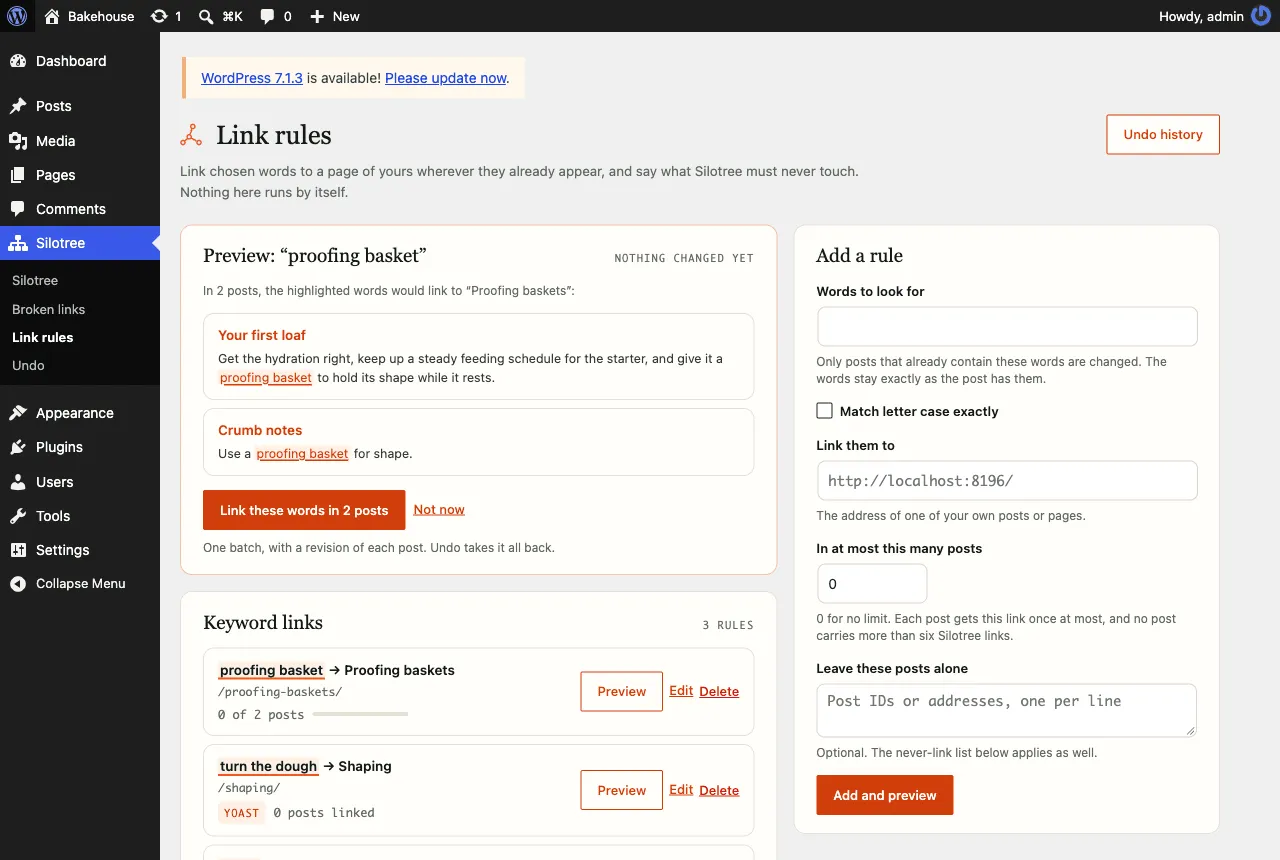
Every sentence a rule would change is shown before anything is written. Press Link these words
Press Link these words in 2 posts (the number matches the preview), or Not now. Each run links up to 25 posts, as one batch with a revision of each post saved first. The result says Linked 2 posts and offers Undo this run. If more posts match, apply the rule again to continue.
Or import your Yoast or Rank Math focus keywords
If Yoast SEO or Rank Math is active, a card headed Start from Yoast (or Rank Math) offers Import focus keywords. Each published post’s focus keyword becomes a rule linking to that post. Rules are only created — you still preview and apply each one. Keywords that already have a rule, or that two posts share, are skipped. For Rank Math, only a post’s first focus keyword is used.
What you should see
The rule appears under Keyword links with how many posts it has linked. Imported rules carry a Yoast or Rank Math tag. Every run is listed on Silotree → Undo as Keyword rule: “your words”.
If it doesn’t work
- “Nothing to link right now”
No published post contains the words outside headings, captions, code and existing links — or every one already links to that page, or is on the never-link list. Posts built with a page builder are skipped too.
- “Rules link to pages on this site”
Paste the address of one of your own posts or pages, not another site.
- “There is already a rule for those words”
Edit the existing rule under Keyword links instead.
- A post was skipped with a reason
For example, it already has six Silotree links, or someone is editing it. See a link didn’t land.
- Apply is greyed out with “Your 10 free links are written”
Rules can still be previewed. Applying them is on a paid plan — see upgrade your plan.
The same words linking to the same page from dozens of posts reads as mechanical to people and to search engines. Read when exact-match anchor text goes too far before you import a whole site’s focus keywords.
Questions
How many posts does one rule change?
Up to 25 posts each time you apply it, and only posts that already contain the words. Apply again to continue. “In at most this many posts” caps the total; 0 means no limit.
Will a rule add the same link twice to a post?
No. Each rule links the first safe place its words appear, once per post, and skips posts that already link to the target. No post carries more than six Silotree links.
Can keyword rules run on the free plan?
They share the free plan’s 10 written links with everything else. After those, rules can still be previewed; applying them is on a paid plan.