Upgrade or change your plan
Plans are chosen in Settings → Plan & billing and paid through Creem, our merchant of record. Moving between plans later changes your existing subscription, prorated, instead of starting a second one.
Steps
Open Settings → Plan & billing
In Silotree, open Settings → Plan & billing. Upgrade buttons elsewhere in the app — on Links to add, the Results card, or the site limit — land here with a plan already picked.
Choose Monthly or Yearly
Choose Monthly or Yearly · 2 months free.
Press Choose for the plan you want
The picker shows your plan and the ones above it, tagged Your plan, You picked this or Fits your sites. Press Choose Solo yearly (or the plan and interval you want). The button says Opening checkout… while it works.
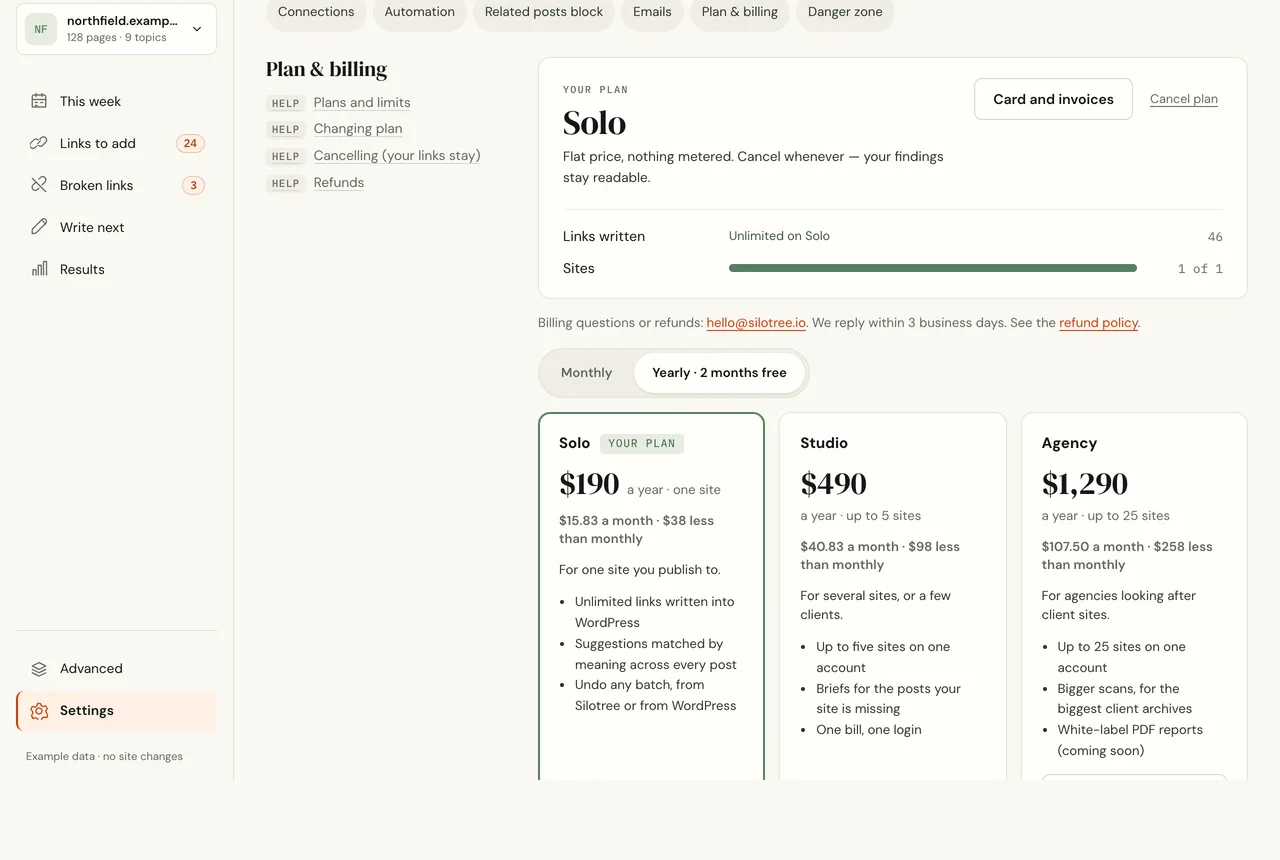
Plan & billing on a paid plan. Pay in Creem’s checkout
On your first upgrade, Creem’s checkout opens. Creem is our merchant of record: it takes the payment, adds any sales tax, and emails your receipt. If you already pay for a plan, there is no second checkout: your subscription is changed in place, and Creem charges the prorated difference straight away.
Wait for the plan to show as active
You return to Settings. It says Payment received, finishing setup… until Creem confirms, then Your Solo plan is active. After a plan change it says Plan change sent.
What you should see
Your plan shows the new plan, and its limits apply straight away: approved links can be written, more sites added, and the next scan reads more pages — see plans and limits. Links you approved on the free plan are ready to write from the bar on Links to add.
If it doesn’t work
- “Checkout was cancelled. Nothing was charged”
You closed Creem’s checkout before paying. Choose the plan again when you are ready.
- “Still not switched on?”
Creem’s confirmation can be slow. Wait a minute and refresh. If your card was charged and the plan still isn’t active, write to us and we will sort it out.
- “Your last payment did not go through”
Creem retries the card, and your plan stays active for 14 days meanwhile. Press Card and invoices to update your card in Creem’s portal.
- I want a smaller plan, or to switch from yearly to monthly
The picker only offers your plan and bigger ones. Write to us and we will arrange it through Creem. Sites you already have keep working.
- I need an invoice
Every receipt comes from Creem by email. Card and invoices opens Creem’s portal, where you can download them.
Questions
Can I switch plans later?
Yes. Choosing another plan changes your current subscription; Creem prorates the difference and charges it straight away. You are never charged twice for the same period.
Where are my invoices?
Creem emails a receipt for every payment. Card and invoices in Settings → Plan & billing opens Creem’s billing portal, where you can download them and change your card.
Can I move to a smaller plan?
The plan picker only offers your plan and bigger ones. To move down, write to us and we arrange it through Creem; sites you already have keep working.