Read your Results and the impact number
Results shows what your site gets from Google and what Silotree changed. The impact number compares the posts you linked with similar posts you didn’t, from your own Search Console. It is an observation, not proof that a link caused a change.
Steps
Open Results
Open Results in the sidebar. It has three tabs: Traffic, Posts slipping and Changes & undo. Traffic and Posts slipping need Search Console — see how to connect Search Console.
Read the Traffic tab
The figures at the top are your site’s clicks over the last 28 days, Google views (impressions), average position, and how many pages are Almost on page one — at positions 5 to 20, where a few more links can help most.
Posts that got a link from us lists each post Silotree linked, with its clicks in the 28 days before the link and the 28 days after. It shows what happened, not a forecast.
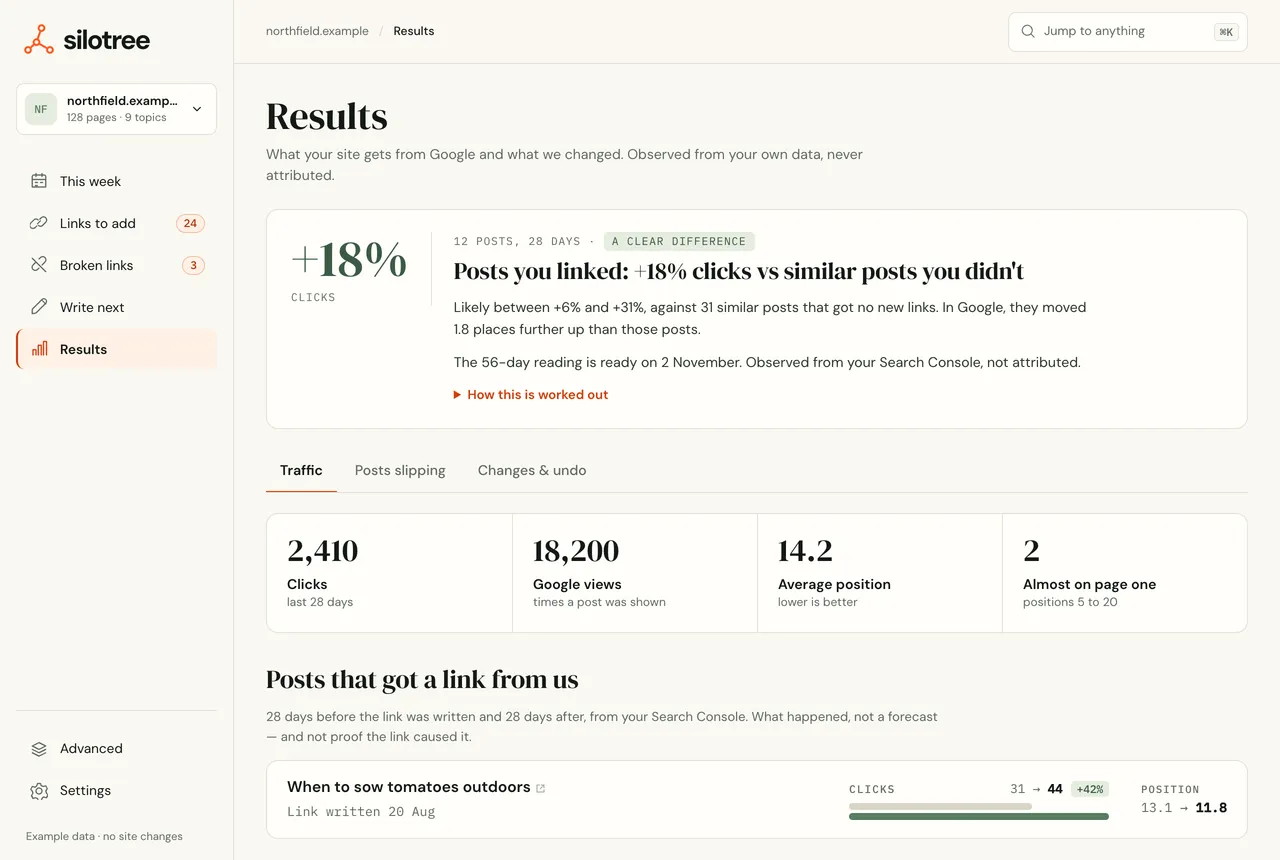
The Traffic tab. Every figure comes from your own Search Console. Read the impact card
The impact card answers one question: did the posts you linked do better than similar posts you didn’t? Its headline reads, for example, Posts you linked: +18% clicks vs similar posts you didn’t, with how many posts it covers and a likely range.
- Each linked post is compared with up to three similar posts — same topic, similar search traffic, no new links — over the 28 days before and after.
- The range is a 90% range. A clear difference means at least ten posts and a range that doesn’t include zero; otherwise it says Too close to call yet or Early reading: too few posts to call.
- It needs at least five linked posts with 28 days of data since the link. Until then it says when it will be ready, or how many more posts to link.
Check Posts slipping
Posts slipping lists posts losing clicks, so you can give them links before they fall further. It needs 56 days of history; until then it says how many days to wait.
Use Changes & undo to see every batch
Changes & undo lists every batch Silotree wrote, with an Undo on each — see write and undo batches.
What you should see
Your traffic, the comparison of linked and unlinked posts, the posts that need attention, and a full record of changes, all from your own data. The same summary arrives in the weekly email.
Similar posts that got no link are the comparison, which rules out seasonality and Google updates — they hit both groups — but not every other difference between posts. So the number describes what happened to the posts you linked; it doesn’t prove the links caused it. Silotree never adds clicks up into a figure for “traffic we earned you”.
If it doesn’t work
- “Connect Search Console to see your traffic”
Connect it — see connect Search Console. Data arrives with the next scan.
- “Your first comparison is on its way”
The comparison runs once a week, never when you open the page. The first runs within a week of connecting Search Console.
- “Link 3 more posts to see what linking does”
Five linked posts is the minimum for a comparison worth reading. Write a few more links from Links to add.
- The number went down
Over a few weeks and a handful of posts, noise is normal. Look at the range: if it spans zero, the honest reading is “no clear difference yet”. If Search Console data stops arriving, see Search Console won’t connect.
Questions
How is the impact number worked out?
Each post you linked is compared with up to three similar posts on the same topic that got no new links. Silotree compares the 28 days before the link with the 28 days after, for both, and reports the difference with a 90% range.
Why does it say “not attributed”?
Because the comparison rules out seasonality and Google updates, which hit the similar posts too, but not every other difference between posts. It shows what happened, not proof that the link caused it.
When will I see a number?
Once at least five linked posts have 28 days of data after the link, and Search Console is connected. The card says when it expects to be ready. It calls a result “clear” only with ten posts or more and a range that excludes zero.