Add links while you write, with the block editor sidebar
The Silotree sidebar reads your draft as you type and lists the posts it should link to, with the exact words that would become the link. It works without an account, and nothing is published until you save.
Steps
Open a post in the block editor and open the Silotree sidebar
Open any post or page in the block editor. Press the Silotree icon in the top bar, or choose Silotree from the editor’s options menu (the three dots). The sidebar only reads your draft while it is open, about a second after you stop typing.
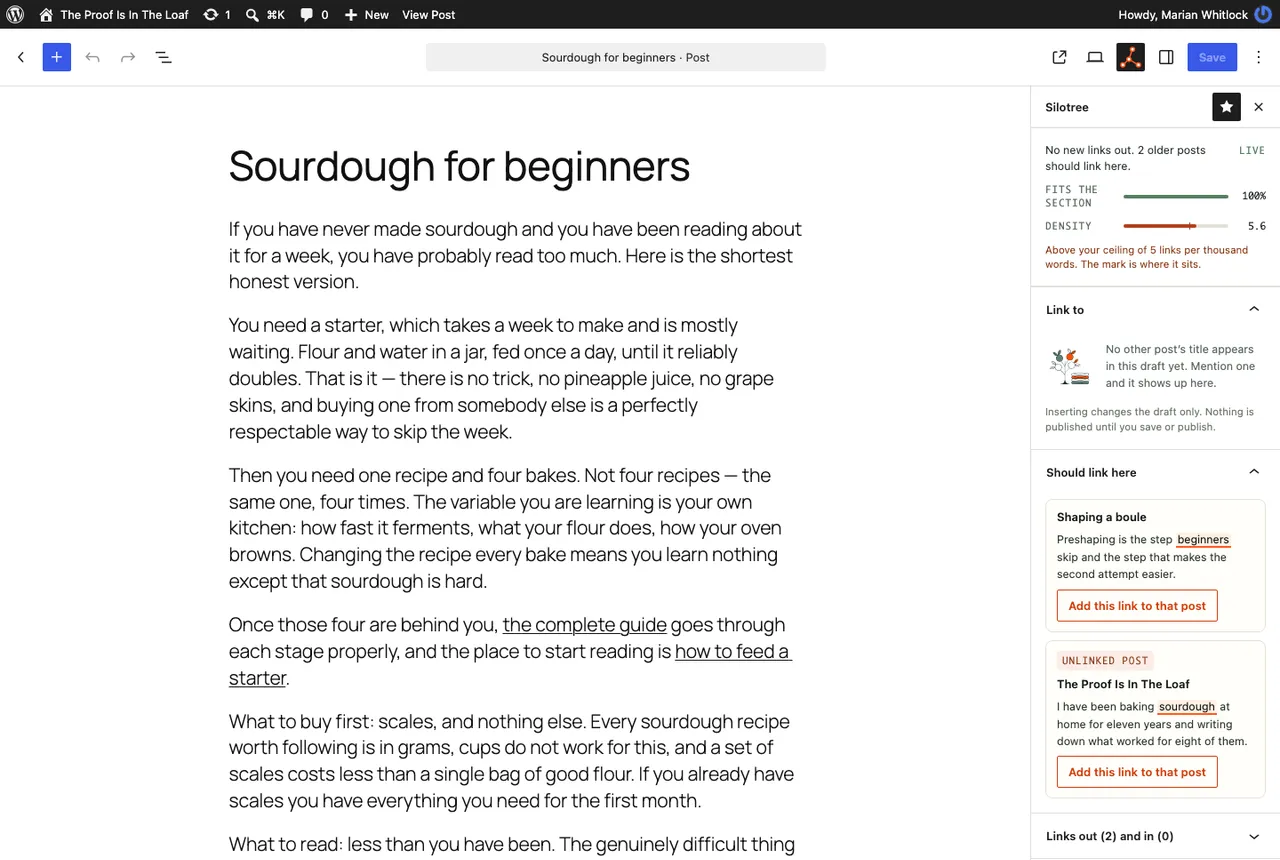
The sidebar marks the words that would become each link, in the sentence where they sit. Read the suggestions under Link to
The top says how many links are worth adding, best first. Each card under Link to names the post the link would point to, shows your sentence with the words underlined, and says why , for example, that nothing links to that post yet.
The Density meter shows links per thousand words. Your ceiling is 5; above it, the sidebar stops suggesting more. It needs 300 words before it judges.
Press Insert link, or Skip
Insert link wraps the underlined words in a link in your draft, and a message offers Undo. Skip hides the suggestion. Inserting changes the draft only.
After publishing, link older posts in under Should link here
Once the post is published, Should link here lists older posts that mention it. Press Add this link to that post to write the link into the older post straight away, with a revision saved first. In the block editor, publishing a post also opens a prompt offering the same links; press Add 1 link (the count follows what you tick) or Not now. There is no limit on how many links you add this way.
At the bottom of the sidebar a short note explains that these suggestions come from your post titles, worked out on your server, and that a free Silotree account also matches posts by meaning. Press its × to hide it: for a month the first time, three months the second, and for good after that.
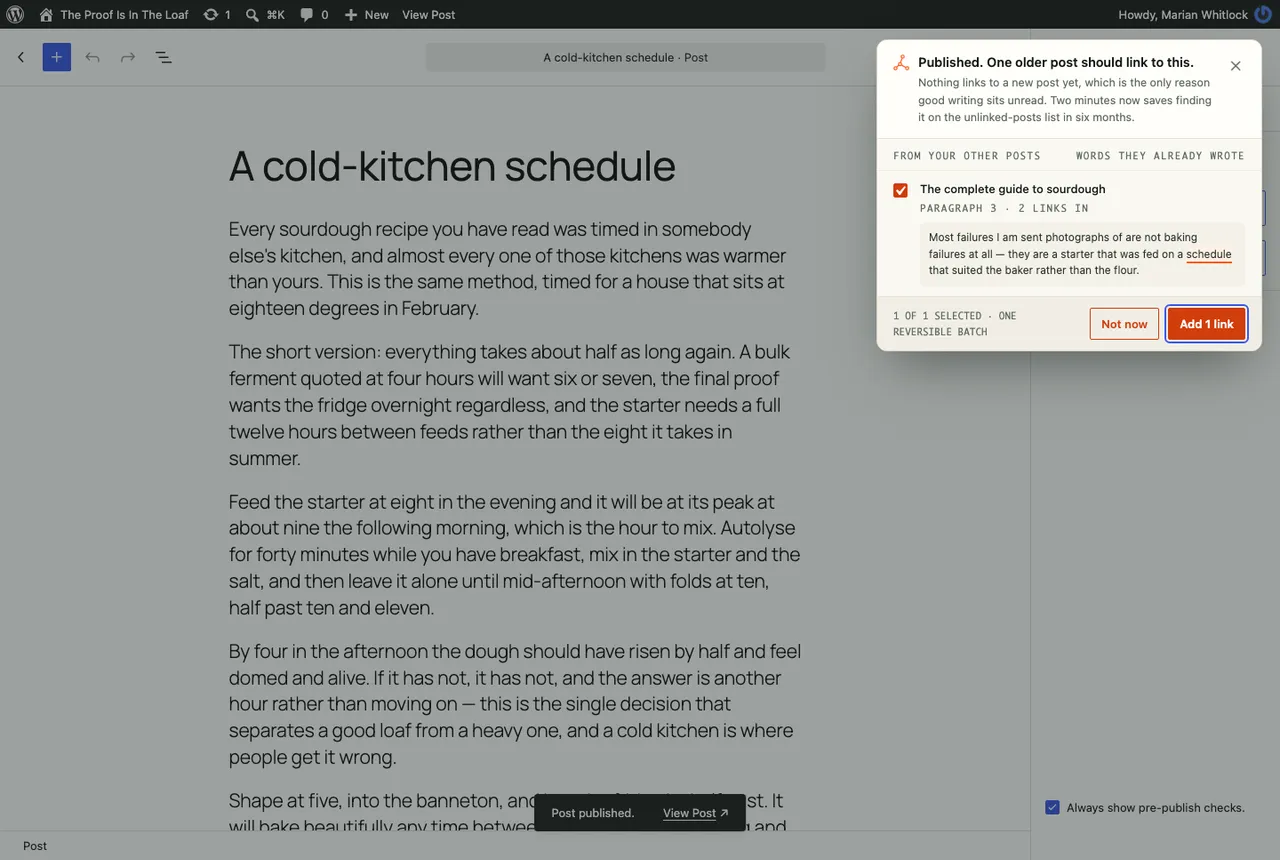
After you publish, older posts that already mention the new one can link to it in one batch. Save or update the post
Save or update the post as usual. Nothing you inserted is published until you do.
What you should see
The links you inserted are in your draft as ordinary links. Links added to older posts appear in those posts at once, and can be taken back out from Silotree → Undo (see write and undo batches).
If it doesn’t work
- “That paragraph has changed since, so use the editor’s own undo”
You edited the paragraph after inserting the link. Press Ctrl + Z (⌘ + Z on a Mac) instead.
- “Those words are not in a paragraph or list Silotree can write to”
The words sit in a heading, a caption or another plugin’s block. See what the plugin will and won’t edit.
- “This post is on your never-link list”
Remove it from the never-link list if you want suggestions for it.
- No Silotree icon in the editor
The sidebar loads only in the block editor, on public post types. If your site uses the Classic Editor, see the Classic Editor box. For why the density ceiling is 5, read how many internal links per page.
Questions
Does the sidebar need a Silotree account?
No. The suggestions are worked out on your own server from your published posts. An account adds suggestions matched by meaning across the whole site, and writing links you approve in the app.
What is the density meter?
Links per thousand words in the draft. The ceiling is 5; above it, the sidebar stops suggesting more. It needs at least 300 words before it judges.